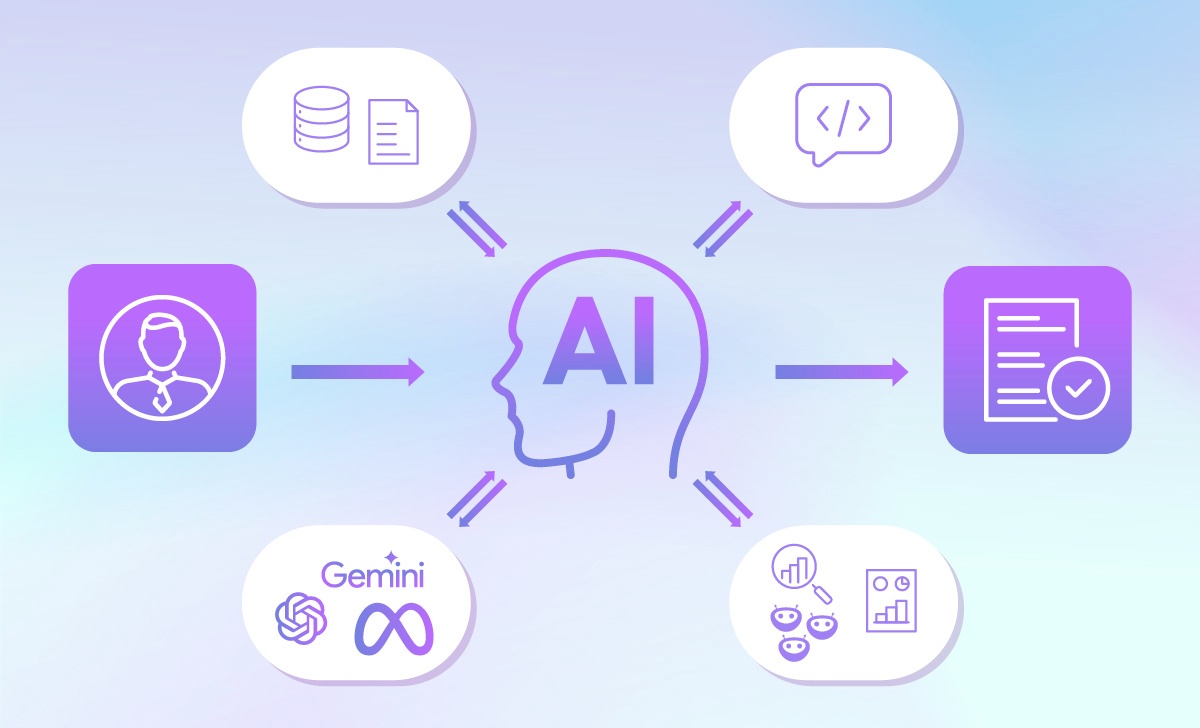




Automation in eCommerce is fundamentally about operational structure. As brands expand their product catalogs, enter new markets, and add sales channels, the number of repetitive coordination tasks increases. Product data must be formatted, assets prepared, systems synchronized, reports compiled, and customer inquiries routed. These processes are necessary, but they often consume time without adding strategic value.
AI-enhanced workflows and system orchestration allow these recurring tasks to follow predefined rules. Product launches can trigger asset preparation and content generation. Orders can update CRM and ERP systems automatically. Support requests can be categorized and routed based on structured logic. The underlying objective is consistency and efficiency across teams and platforms.
This article outlines 10 practical automation workflows across three areas: product launch, order and inventory operations, and customer experience. Each example focuses on realistic implementations that improve throughput, reduce manual handling, and support scalable growth within an existing commerce environment.
TMO helps enterprises design and develop Agentic AI systems for eCommerce and operational scenarios.
A) Product Launch Speed & Consistency
Product launches are one of the most leverageable areas for automation because they involve creative production, operational execution, and commercial activation. Every new SKU requires visual preparation, structured content, localization, platform formatting, and multi-channel distribution.
When these steps are standardized and orchestrated through workflows, brands can transform product launches from a sequence of manual tasks into a repeatable, scalable engine that while maintaining brand guardrails:
- Consistent asset preparation
- structured metadata generation
- synchronized channel publishing
Instead of increasing coordination overhead as SKU counts grow or markets expand, brands can design workflows that ensure each new product follows the same validated process.
1. Visual Asset Scaling
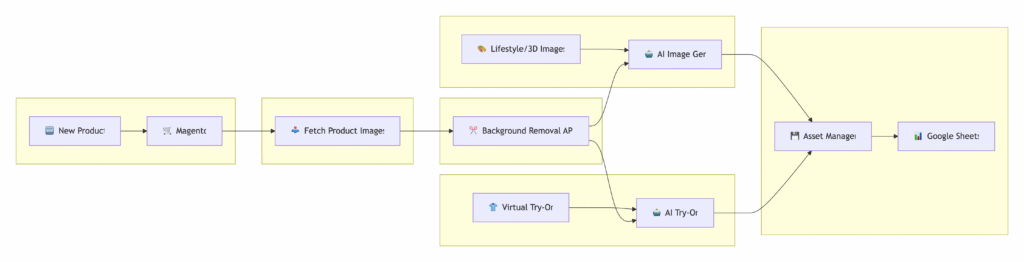
Visual production is one of the most resource-intensive parts of launching or expanding a product catalog. Every SKU variation requires:
- Clean background images
- Marketplace-compliant formatting
- Lifestyle or hero imagery
- Channel-specific dimensions
- Increasingly, short-form video or 3D visuals
Automation turns asset preparation into a structured workflow instead of a design bottleneck. Implementing a workflow similar to the examples above, this could look like:
| Stage | Description |
|---|---|
| Trigger | A new product image is uploaded or a new SKU is created in the store, PIM, or shared database. |
| Background Processing | The original image is sent to a background removal and cleanup service to generate a clean master asset. |
| Asset Enhancement | Additional variants are generated, such as lifestyle backgrounds, hero banners, or short 3D-style motion visuals. |
| Conditional Branching | If the product category meets specific criteria (e.g., apparel), a virtual try-on variation is generated automatically. |
| Formatting Rules | Images are resized and reformatted to meet predefined marketplace and social channel requirements. |
| Validation & Approval | Resolution, file size, and naming conventions are checked, and assets are routed internally for review if required. |
| Publishing & Logging | Finalized assets are uploaded back to the eCommerce platform or DAM, and the workflow logs completion status. |
2. International SEO & Localization Automation

Expanding into new markets increases the volume and complexity of product content. Each SKU requires localized metadata that aligns with search intent, platform rules, and brand guidelines. Typical requirements include:
- SEO-optimized product titles
- Meta descriptions tailored to local keywords
- Structured bullet points and attributes
- Accurate translation of technical specifications
- Tone consistency with brand standards
- Secondary validation before publication
Automation transforms localization into a structured, repeatable workflow rather than a manual rewriting process:
| Stage | Description |
|---|---|
| Trigger | A new product is created or marked for expansion into a new market. |
| Content Extraction | Core product attributes, specifications, and existing descriptions are pulled from the store or PIM. |
| SEO Generation | AI generates localized titles, meta descriptions, and keyword-aligned copy based on predefined prompts. |
| Translation Layer | Product content is translated into the target language with terminology constraints applied. |
| Brand Guideline Check | Output is evaluated against tone-of-voice rules, prohibited claims, and formatting standards. |
| Secondary Validation | A validation step checks keyword inclusion, character limits, and structural compliance. |
| Publishing & Logging | Approved metadata is pushed to the target storefront and the workflow records completion status. |
This approach enables faster international rollout, enforces consistency across markets, and reduces repetitive localization work while maintaining governance controls.
3. Product Listing Generation

Creating structured product listings at scale becomes increasingly complex as SKU counts grow and sales channels multiply. Even when core product data already exists, transforming it into platform-ready listings requires formatting, enrichment, and consistency checks. Typical listing preparation includes:
- Extracting structured attributes
- Generating formatted descriptions and bullet points
- Assigning categories and tags
- Aligning with platform-specific formatting rules
- Ensuring consistency across variants
Automation converts raw product data into publish-ready listings through predefined templates and enrichment logic.
| Stage | Description |
|---|---|
| Trigger | A new product record is added to a PIM, spreadsheet, or database. |
| Data Extraction | Product attributes, specifications, and media assets are pulled into the workflow. |
| Content Structuring | Descriptions, bullet points, and structured sections are generated using predefined templates. |
| Categorization Logic | The workflow assigns product types, collections, and tags based on rule-based or AI classification. |
| Platform Formatting | Character limits, HTML structure, and required fields are validated against the target platform. |
| Quality Control | The listing is checked for missing attributes, duplicated data, or formatting conflicts. |
| Publishing & Logging | The finalized product listing is pushed to the store or marketplace and recorded as completed. |
This approach increases listing throughput, ensures formatting consistency, and allows catalog expansion without proportional increases in manual drafting effort.
4. Automated Content Distribution

Publishing a product is only one step. Activation across marketing channels requires coordinated messaging, formatted creatives, and internal visibility. When this is handled through structured workflows, product launches become synchronized rather than sequential. Typical post-publication activities include:
- Drafting social media posts
- Updating product carousels or ads
- Generating channel-specific captions
- Notifying marketing or social teams
- Ensuring message consistency across platforms
Automation makes distribution event-driven, triggered directly from product publication:
| Stage | Description |
|---|---|
| Trigger | A product status changes to “Published” in the eCommerce platform. |
| Data Extraction | Product name, pricing, attributes, images, and URLs are retrieved automatically. |
| Prompt & Content Generation | Channel-specific captions and post drafts are generated using predefined templates. |
| Channel Formatting | Content is adapted for character limits and media requirements per platform. |
| Ad Asset Update | Product data feeds into dynamic ads or product carousel creatives where applicable. |
| Internal Notification | A draft is sent to the social media manager for review and approval. |
| Publishing & Logging | Approved content is scheduled or published, and the workflow records completion status. |
This approach aligns product publication with marketing activation, reduces coordination overhead, and ensures consistent messaging across channels without additional manual sequencing.
B) Order & Inventory Consistency Across Systems
Order and inventory workflows represent a high-impact opportunity to improve operational clarity and financial control. Each transaction generates data that can enrich CRM systems, update ERP records, trigger marketing segmentation, and inform restocking decisions. When these processes are orchestrated through automation, data moves in real time rather than through manual reconciliation.
Automation in this layer focuses on system synchronization and structured decision support. Trigger-based workflows can ensure that orders update downstream systems immediately:
5. Order Processing Automation
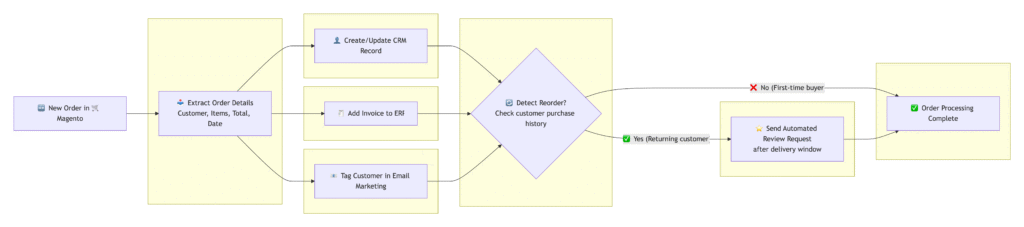
Every new order generates operational signals that extend beyond the transaction itself. When structured correctly, order events can automatically update downstream systems, enrich customer profiles, and trigger lifecycle actions. Typical order-related actions include:
- Creating or updating CRM records
- Generating invoices in ERP systems
- Tagging customers in email marketing platforms
- Identifying repeat purchases
- Triggering post-purchase engagement
Automation ensures these actions occur immediately and consistently after each order event:
| Stage | Description |
|---|---|
| Trigger | A new order is created in the eCommerce platform. |
| Customer Sync | Customer data is created or updated in the CRM with order details and lifetime value metrics. |
| Financial Record Creation | Invoice or transaction data is sent to the ERP or accounting system. |
| Marketing Segmentation | The customer is tagged based on product category, order value, or purchase frequency. |
| Conditional Logic | If the order is a repeat purchase, a review request or loyalty workflow is triggered. |
| Data Validation | Order totals, SKU mapping, and tax calculations are checked for consistency before final confirmation. |
| Logging & Monitoring | The workflow records execution status and flags exceptions for review. |
This approach creates real-time system alignment, reduces manual reconciliation, and enables structured post-purchase engagement without additional coordination effort.
6. Inventory & Restocking Automation

Inventory management becomes increasingly complex as sales channels expand and SKU counts grow. Instead of relying on periodic manual reviews, automation allows stock levels and sales velocity to drive structured restocking signals. Typical inventory-related activities include:
- Monitoring stock thresholds
- Tracking sales velocity by SKU
- Identifying fast-moving or slow-moving products
- Generating restock recommendations
- Notifying operations or procurement teams
Automation transforms inventory monitoring into a continuous, data-driven process.
| Stage | Description |
|---|---|
| Trigger | Inventory levels are updated or a scheduled stock check runs at predefined intervals. |
| Data Aggregation | Current stock levels and recent sales data are retrieved from the eCommerce platform. |
| Sales Velocity Analysis | The workflow calculates average daily sales and projected stock depletion dates. |
| Threshold Evaluation | SKUs are compared against predefined reorder points or safety stock levels. |
| Restock Recommendation | Suggested reorder quantities are generated based on sales trends and lead times. |
| Notification | Procurement or operations teams receive structured alerts for action. |
| Logging & Reporting | The system records stock evaluations and recommended actions for visibility. |
This approach improves forecasting discipline, reduces the risk of stockouts or overstocking, and enables proactive inventory control without increasing manual oversight.
7. Automated Sales Reporting

Sales reporting often relies on manual exports, spreadsheet consolidation, and repetitive formatting. Automation enables structured reporting that is generated consistently and delivered on schedule, without manual intervention. Typical reporting outputs include:
- Weekly or monthly sales summaries
- Revenue by SKU, category, or channel
- Inventory movement snapshots
- Order volume trends
- Performance comparisons across periods
Workflow automation transforms reporting into a predictable, repeatable process:
| Stage | Description |
|---|---|
| Trigger | A scheduled workflow runs weekly or monthly at a predefined time. |
| Data Extraction | Order, revenue, and inventory data are retrieved from the eCommerce platform. |
| Data Aggregation | Metrics are grouped by SKU, category, channel, or time period. |
| Calculation Layer | Key indicators such as total revenue, average order value, and stock movement are computed. |
| Report Generation | Results are formatted into a structured spreadsheet or dashboard-ready file. |
| Distribution | The report is automatically sent to relevant stakeholders. |
| Archiving | A copy of the report is stored for historical tracking and comparison. |
This approach ensures reporting consistency, reduces manual spreadsheet work, and provides operations and management teams with timely visibility into performance trends.
C) Customer Experience and Support
Customer experience presents a significant opportunity for intelligent workflow design because many interactions follow repeatable patterns. Order status inquiries, product clarification requests, sizing questions, and post-purchase feedback all generate structured signals that can be routed, enriched, or responded to systematically.
By combining workflow orchestration with AI-based classification and knowledge retrieval, brands can design support systems that maintain responsiveness while scaling efficiently:
8. Customer Service Automation (AI Support & Email Routing)
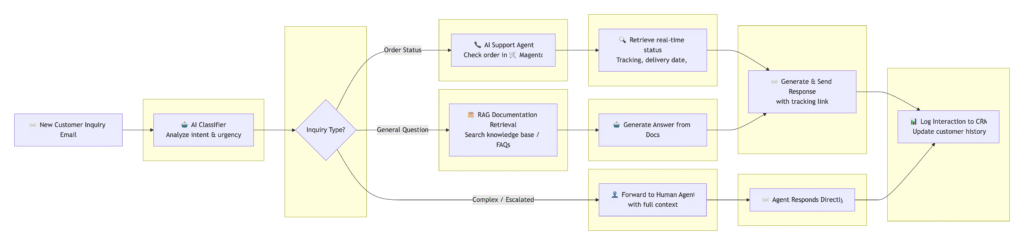
Customer support volume increases with order growth, but many inquiries follow structured and predictable patterns. Automation enables consistent triaging and response generation while maintaining human oversight for complex cases. Typical inbound interactions include:
- Order status inquiries
- Shipping and return questions
- Product clarification requests
- Warranty or defect claims
- General pre-purchase questions
Workflow orchestration combined with AI classification and retrieval enables structured handling at scale.
| Stage | Description |
|---|---|
| Trigger | A new support email, chat message, or ticket is received. |
| Content Classification | AI classifies the inquiry type (order status, return, product question, etc.). |
| Data Retrieval | Relevant order details or knowledge base documents are retrieved automatically. |
| Response Drafting | A context-aware reply is generated using predefined templates and verified information sources. |
| Conditional Routing | If the issue exceeds predefined complexity thresholds, the ticket is routed to a human agent. |
| Quality Safeguards | The response is checked against policy rules and tone guidelines before sending. |
| Logging & Analytics | Inquiry type and resolution time are logged for performance tracking. |
This approach reduces first-response time, improves routing accuracy, and allows support teams to focus on high-complexity cases rather than repetitive inquiries.
9. CX Virtual Fitting Room

Virtual fitting experiences extend product visualization beyond static images by allowing customers to simulate fit or appearance before purchase. When integrated into a structured workflow, this becomes a scalable feature rather than a one-off campaign tool. Typical fitting-related objectives include:
- Reducing uncertainty around size and fit
- Improving confidence in purchase decisions
- Lowering return rates
- Increasing conversion for apparel and accessories
Automation enables this experience to be triggered and managed systematically.
| Stage | Description |
|---|---|
| Trigger | A customer selects a product and activates the virtual fitting feature. |
| Input Collection | Customer measurements, size selection, or uploaded image data are captured securely. |
| Processing Layer | AI generates a simulated try-on visualization based on product and user inputs. |
| Variant Mapping | The system matches product variants (size, color) to the simulation model. |
| Display Rendering | The generated preview is rendered directly within the product page interface. |
| Optional Data Capture | Interaction data is logged to analyze fit preferences or sizing trends. |
| Fallback Handling | If generation fails or inputs are incomplete, the system reverts to standard product imagery. |
This approach enhances purchase confidence, supports informed decision-making, and creates a structured way to deploy advanced visualization without manual intervention.
10. Review Monitoring & Sentiment Analysis
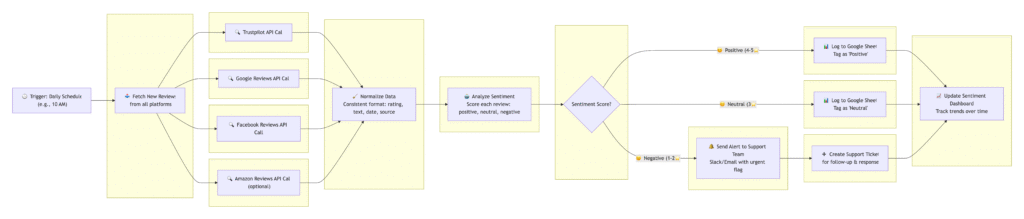
Customer reviews across marketplaces and platforms contain structured signals about product performance, quality perception, and recurring issues. When aggregated and analyzed systematically, they become an operational feedback loop rather than passive commentary. Typical review-related objectives include:
- Consolidating feedback from multiple platforms
- Detecting recurring complaints or product defects
- Identifying positive themes for marketing use
- Monitoring sentiment shifts over time
- Supporting product and sourcing decisions
Automation enables continuous aggregation and structured analysis instead of periodic manual checks.
| Stage | Description |
|---|---|
| Trigger | A scheduled workflow runs daily or weekly to collect new reviews. |
| Data Aggregation | Reviews are pulled from marketplaces, social platforms, or review services into a centralized dataset. |
| Normalization | Ratings, timestamps, and product identifiers are standardized across sources. |
| Sentiment Analysis | AI evaluates tone and extracts key themes or recurring keywords. |
| Trend Detection | The workflow flags unusual spikes in negative sentiment or repeated issue patterns. |
| Reporting | A structured summary is generated for product, CX, or operations teams. |
| Escalation Logic | Critical issues automatically trigger internal alerts for investigation. |
This approach transforms fragmented review data into actionable insight, supports continuous product improvement, and ensures that sentiment trends are identified early rather than reactively.
Building Automation the Right Way
Automation delivers compounding value when it is implemented with structure, ownership, and technical discipline. Without that foundation, even well-designed workflows introduce inconsistency and risk. The following principles define a controlled approach:
1. Start With Data Foundations
Automations are only as reliable as the data they consume, and disconnected systems or inconsistent schemas will undermine AI outputs and trigger unreliable workflows.. Before expanding workflow coverage:
- Audit product, order, and customer data structures
- Standardize naming conventions and SKU logic
- Align identifiers across ERP, CRM, commerce platform, and marketing tools
- Ensure event tracking is complete and consistent
This is where a structured commerce architecture blueprint becomes critical. Clear module ownership, defined system boundaries, and documented data flows reduce rework and prevent automation from being layered on unstable foundations.
2. Pilot Narrow, High-Confidence Use Cases
Designing pilots where a human remains the approver or supervisor, clear validation steps are built into the flow, and exceptions are logged and reviewable instead of launching broad, autonomous automations without guardrails:
- Asset formatting
- Order synchronization
- Reporting generation
- Email routing
Starting with repetitive, rule-based workflows will help build confidence and expose structural gaps early.
3. Establish Governance Before Scaling
As workflows expand, governance becomes mandatory. Define:
- Ownership for each automation
- Approval requirements before publishing outputs
- Escalation paths for errors or edge cases
- Logging and auditability standards
- Version control and change management
This governance layer ensures that automation remains traceable and production-ready. Without it, scaling introduces operational ambiguity. Consider implementing an AI + Automation Governance Layer that formalizes these rules so outputs are safe, reviewable, and accountable across teams.
4. Design an AI-Ready Stack
If your commerce stack was not designed with AI in mind, workflows may function inconsistently or generate unreliable results. AI-enhanced workflows depend on:
- Clean product and customer data
- Structured event tracking
- Stable API connections
- Modular platform design
An AI-ready commerce stack design ensures that data flows, triggers, and integrations are intentionally structured to support intelligent automation rather than patched together reactively.

5. Invest in Internal Capability
Automation is not a one-time deployment, and its sustainable adoption requires:
- Designated internal champions
- Teams trained to monitor and refine workflows
- Documentation for escalation and troubleshooting
- Ongoing performance reviews
When teams understand the system, automation becomes an operational asset rather than a black box.
6. Stress-Test for Resilience
Before scaling, validate:
- Failure handling logic
- Fallback scenarios
- API downtime responses
- Monitoring and alerting mechanisms
- Edge cases and unusual input conditions
Every automated workflow should have defined recovery logic. Resilience prevents isolated errors from cascading into customer-facing issues.
7. Avoid Automation for Its Own Sake
Not every process benefits from automation. Areas requiring judgment, nuance, or brand sensitivity may require structured human oversight. Over-automation can:
- Reduce flexibility
- Introduce tone inconsistencies
- Damage customer experience
The objective is efficiency with control, not maximum automation coverage.
8. Measure Real Impact
Automation should be evaluated against measurable outcomes:
- Time-to-publish reduction
- Error rate reduction
- Inventory turnover improvement
- Support response time changes
- Return rate impact
- Margin protection
Without defined KPIs, automation becomes activity rather than value creation.
Building an AI & Automation-first Commerce Architecture with TMO
AI and workflow automation in eCommerce are architectural decisions that affect how data flows, how teams collaborate, and how reliably operations scale.
The examples in this article demonstrate that meaningful gains often come from structured, practical workflows rather than experimental AI initiatives. Asset generation, order orchestration, inventory forecasting, support routing, and reporting can all deliver measurable efficiency when built on stable foundations.
At TMO, we approach AI and automation from an eCommerce systems perspective. We design the architecture, align the data layer, and implement governance structures that make workflows production-ready rather than experimental.
To explore how AI can be integrated into your workflows based on your organization’s current level of maturity, contact TMO to start a tailored conversation.